
When I said forever
A tense reunion in a dark room, an embrace, and a return to warm beach memories.
IPHONE SAFARI · NO-APP GUIDE
Put you and your partner in a zombie love story with two portraits. Start in the web studio below, or follow the iPhone Safari steps first.
This web studio provides photo uploads, story settings and generation controls without installing a separate app. A complete workflow on physical iPhone Safari has not yet been verified. You will need an account and paid credits to generate.
Local interface and photo-processing checks are documented below. See what has been checked
Choose a story, add a portrait to each role and review the credit quote before generating. Sign in before selecting photos to avoid losing them during login.
Swipe or scroll to browse. Click to select an available template.
Sources and interface checked
The creation form is a web page. Use your existing phone browser and an internet connection; installing a separate generator app or desktop editor is not a step in this site’s workflow. “No app” does not mean offline generation, no account, no payment or a free personalized download.
AIReel’s official Zombie Love Story page also explicitly describes uploading and generating in a phone browser, with its iOS/Android app as an alternative. We read that statement and followed its top Generate link to a web creation page. We did not complete its login, generation or download.
Read AIReel’s mobile-browser statementFor the default adult-couple story, use two separate normal portraits. You do not need to add zombie makeup first. The preset requests the infected look and later healthy memories; the result still needs review.
Open this page in Safari and follow the current web controls below. The screenshots show our interface in a desktop browser resized to 390 pixels; they are not physical iPhone screenshots.
Open this page directly in Safari rather than a social app’s embedded browser. Use the studio’s Sign in link before choosing photos; it returns to this page’s creation section. Unsubmitted photos can be lost when you leave or reload.
Go to the photo studioBrowse the template reel and deliberately select a ready story. Scrolling alone browses the previews. The default couple story moves from a dark-room reunion to beach memories. No custom prompt is needed.
Browse the templatesTap Upload photo and select a picture from your phone’s library or file picker. JPG, PNG, WebP and HEIC/HEIF are accepted; HEIC files are converted in the browser. Wait for processing to finish, then check the thumbnail and role. Person 1 survives and Person 2 is infected in the default story. Use Replace or Remove to correct a selection.
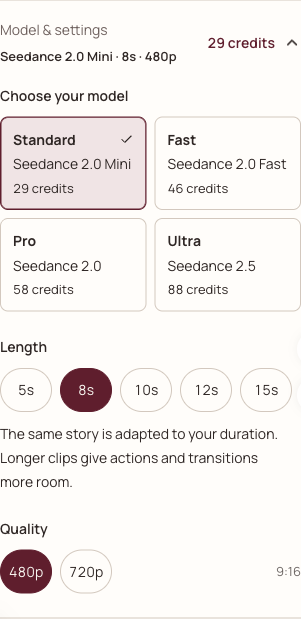
Check photo requirementsChoose the model, duration and quality you want. Defaults are 8 seconds, 480p and 9:16; length and quality changes update the quote. A longer clip may give the story more room, but it does not guarantee every action appears.
Understand the costReview the two roles and current credit total, confirm the photo-permission checkbox, then press Generate video. If generation is unavailable or the quote exceeds your balance, read the message before proceeding. Selecting photos or changing settings alone does not start a paid job.
Return to the formAn accepted task reports progress through the site’s generation notice and My videos. If the connection drops, return with the same account and check for an existing job before trying again. Phone background behavior and browser-restart recovery have not been tested.
Open My videosAfter a successful task, inspect both faces, the embrace, the memory cut and sound. Use Download on the result or in My videos. Follow the browser’s saving controls and play the saved file once; an on-page preview alone does not prove it was saved.
Find the saving instructions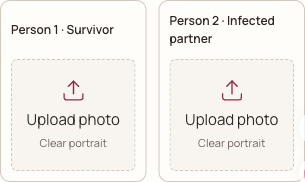
After a successful owned task, use Download on the result or in My videos. Check that the saved file exists and plays. The Safari instructions below are Apple’s general file-saving guidance; this site’s physical-iPhone download remains untested.
After a file downloads in Safari, use the Downloads button beside the search field or look in Files → Browse → iCloud Drive → Downloads, as Apple describes. A downloaded file does not automatically appear in Photos.
Apple’s download instructionsUsing Android instead? Chrome documents Download link from a link’s touch-and-hold menu, and a Download control on some videos. Find downloads in Files or Chrome → More → Downloads. Controls vary by file and browser; this site’s Android export remains untested.
Chrome’s Android download instructionsIf tapping Download shows a not-ready or expired-link message, check the task in My videos or use the support link. Do not generate another paid video solely to test a save button.
Check file size, dimensions and crop against the requirements above. HEIC/HEIF is supported through automatic browser conversion; wait for processing to finish. If a damaged or unsupported HEIC variant cannot be decoded, try a genuine JPG export. Renaming an extension does not convert an image.
The form does not promise persistent storage for unsubmitted photos. Sign in first, then select them again. A portrait selected in a browser picker is not a submitted generation job.
Try opening this page in your regular browser and sign in there. Compatibility inside TikTok, Instagram and other embedded browsers has not been tested; switching browsers can require selecting your photos again.
Check My videos with the same account before resubmitting. An uncertain connection does not establish that generation failed. Confirmed failed tasks return reserved credits; unclear states need a task check or support.
A preview is not a saved file. Use Download after the task succeeds, then check Safari’s download list and Files. If the link reports that the result is not ready or has expired, check My videos or contact support. For silent playback, use the player’s sound controls and check the saved file.
The record below separates implementation checks from device testing. Device: local desktop browser at 390px and 1440px. Physical iPhone model, iOS version and Safari version: not tested. No paid render was started for this guide.
| Part of the journey | Evidence or test | Limit |
|---|---|---|
| Web creation controls | Local desktop browser at 390px and 1440px: shared studio, template selection, settings and changing quotes. | Resized-browser checks do not establish physical-device compatibility. |
| Photo requirements | Client and server requirements inspected. A real HEIC fixture was converted to JPEG and read by the shared studio in a local desktop browser. | A fixture conversion does not verify the physical iPhone/Android album picker, every HEIC variant or a paid generation. |
| Login return and navigation | Local login-link destination, tutorial anchors and reciprocal comparison-page links checked. | No real login or payment completed on a phone. |
| Generation and task recovery | Current submission, task notice and account-history paths inspected. | Paid generation, background suspension and browser-restart recovery on real phones not tested. |
| Download and playback | Current successful-task download control inspected; Apple and Chrome saving documentation read. | No successful owned file downloaded to a physical phone; sound and watermark outcomes not verified. |
| AIReel mobile access | Official mobile-browser statement read; top Generate link opened its web creation page. | No AIReel upload, login, payment, generation or download tested. |
This web studio provides photo uploads, story settings and generation controls without installing a separate app. A complete workflow on physical iPhone Safari has not yet been verified. You will need an account and paid credits to generate.
No separate generator app is required to access this web studio. You can select a ready story, add the two portraits and review settings in the browser. Generation requires an account, an internet connection and paid credits.
This guide focuses on iPhone Safari and also includes Android Chrome saving guidance. Local checks cover the web controls in a resized desktop browser; physical iPhone Safari and Android Chrome workflows remain untested.
Yes, personalized generation here requires sign-in and paid credits. Sign in before choosing photos. The studio’s login link returns to this page, but unsubmitted photos are not guaranteed to survive leaving the form.
The default story in this studio needs two separate portraits: Person 1 survives and Person 2 is infected in the present. Both are healthy in the memory. A single shared couple photo is not a direct substitute for the two fields; use separate portraits and follow the selected template’s role labels.
The studio accepts HEIC/HEIF files and converts them to JPEG in your browser before submission. Wait for processing, then check the portrait preview. The original and converted file must meet the size and dimension requirements above. A local HEIC fixture conversion was checked; physical iPhone album selection remains untested.
No. Use normal portraits for the default story. The preset requests the infected appearance and healthy memory; exact faces, actions and scene transitions are not guaranteed.
HEIC/HEIF is accepted and converted to JPEG in your browser. Wait for photo processing to finish. Inputs and converted files must fit the 5 MiB limit, 300–6000 pixel dimensions and 2:5–5:2 ratio. A damaged or unsupported HEIC variant can still fail; use a genuine JPG export if that happens. Physical iPhone album selection has not been tested for this guide.
No. Viewing references is separate from creating a personalized film. Generation here requires paid credits; the default catalog quote is 8 credits. Review the amount shown by the studio after changing settings.
After a successful task, use Download on the result or in My videos. Check Safari’s Downloads list and the downloaded file in Files, then play it once. Saving to Photos is a separate action and is not automatic. These are general browser instructions; this site’s physical-iPhone saving flow remains untested.
We do not promise automatic saving to Photos or Gallery. A browser download and saving to a photo library are different actions. Check that a file exists and plays; this guide has not tested the photo-library or social-sharing flow.
An accepted task is recorded by the service, and My videos is the place to check it with the same account. The site uses session storage for the current task indicator, which may not survive closing a tab. Phone background behavior and recovery after browser restart have not been tested.
Our workflow adds matching music after rendering. Check the completed file for audible sound and any provider markings; neither a particular song nor a watermark-free output is promised. No real-phone output was generated or saved for this guide.
Sources read October 15, 2026. Browser-vendor help explains general saving behavior. AIReel describes its own product. Neither proves this site’s mobile generation or download success.
Current photo controls, validations, quotes, task history and successful-result download path.
Our own interface and implementation; no paid or physical-phone end-to-end test.Official FAQ explicitly describes phone-browser upload and generation without installing its app.
Official statement read directly; our check did not include its paid workflow.The top Generate link on the effect page led to this web creation entry.
A generic creation entry is not proof that the zombie preset remains selected or that generation succeeds.Where Apple says downloaded files can be found, including Files and Safari’s download list.
General vendor guidance; no generator-specific iPhone save test.Chrome’s general Android download controls and where downloaded files can be found.
General vendor guidance; no generator-specific Android save test.WebKit documents native HEIC importing and editing support in Safari 17. Our studio also includes a local conversion fallback for browsers without native decoding.
Browser-engine documentation is not a test of this site on a physical iPhone.Use the studio on this page, check each role and review the current quote. The iPhone Safari steps and verification record are here if you need them.
Upload photos in the web studio